
An inflatable golf simulator enclosure is worth considering when you need to clear the space after playing or take the bay to another location. The decision depends on the complete routine: moving the packed enclosure, inflating and securing it, positioning the equipment, then drying and storing it. For a dedicated golf room, a fixed frame can be the more convenient starting point because the structure can stay assembled.
Affiliate disclosure: As an Amazon Associate I earn from qualifying purchases. Amazon links below are affiliate links. Manufacturer and Golf Galaxy links are direct information or buying links.
This guide compares All Sports Inflatables’ 12×16 enclosure with Carl’s Place’s DIY frame system for US buyers. Neither enclosure alone supplies a complete simulator. Our home golf simulator guide explains how the screen, tracking hardware, hitting surface and display work together.
Research checked: September 13, 2026. This is a comparison of manufacturer documents and buying requirements. We have not tested either enclosure or measured their setup time, noise or durability.
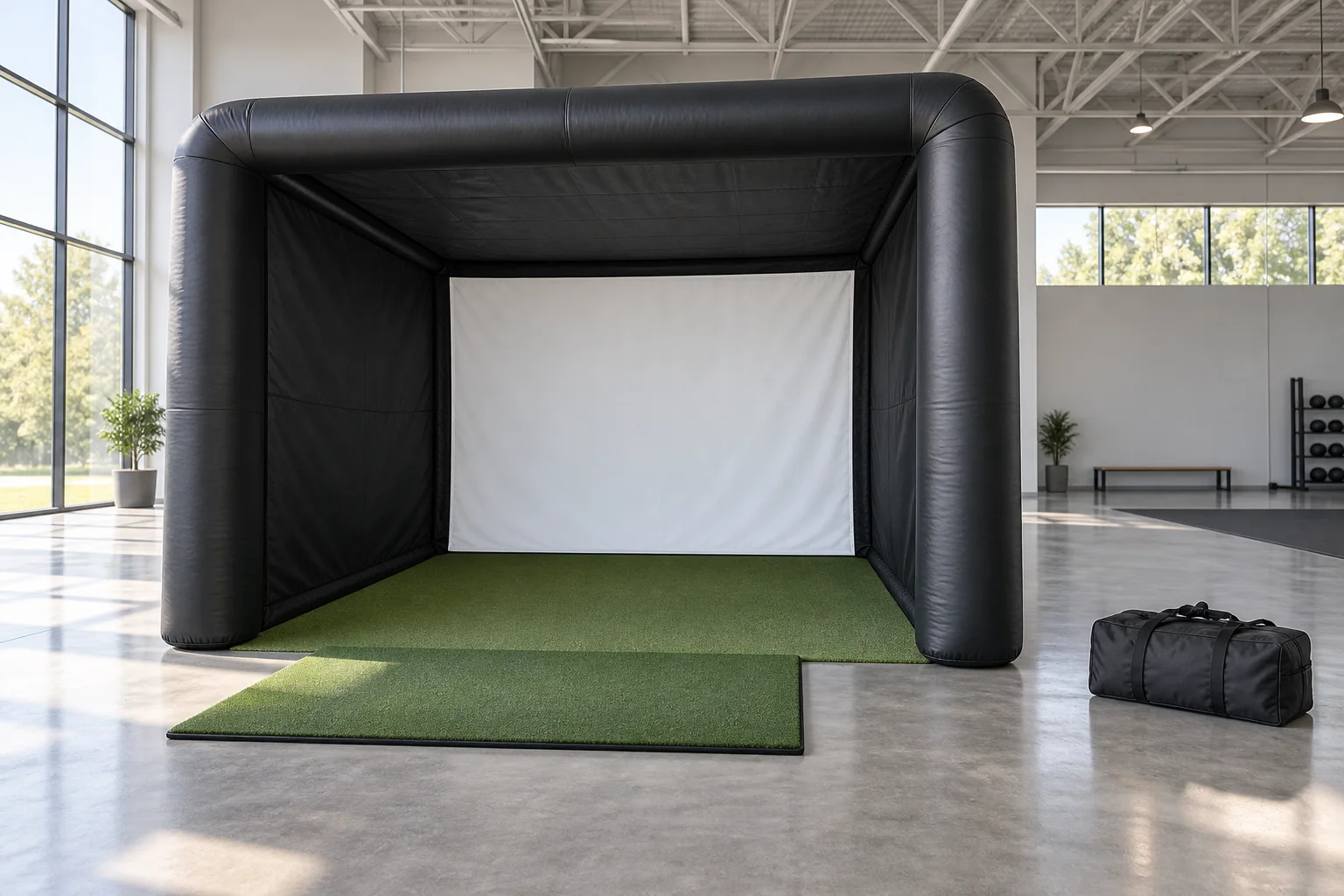
Table of Contents
Inflatable or fixed frame: which fits your routine?
The All Sports Inflatables model offers a structure that packs away; Carl’s DIY kit provides a frame assembled from metal tubing. Compare them as different ways to build a practice area, with the same need for a verified hitting layout and ball containment.
| Buying decision | All Sports Inflatables 12×16 | Carl’s Place DIY enclosure |
|---|---|---|
| Structure | PVC tarpaulin inflatable frame with a coated blackout cover. | Steel fittings and fabric enclosure; the frame requires 1-inch EMT. |
| Size reference | Outside dimensions: 12 ft wide, 16 ft deep and 10 ft high. | Several sizes. The “8 × 10.5” example measures 130.3 inches wide and 100 inches high outside, with a 67.375-inch footprint depth. |
| Hitting layout | The supplier requires an offset hitting mat and one person inside at a time. | Choose the frame size around the approved player, screen and monitor layout. |
| Moving and storage | FAQ estimate: 125 lb, packed approximately 3 × 3 × 3 ft. | Separate pipes, fittings and fabric; plan where an assembled frame or its dismantled components would go. |
| What to add to the order | Confirm the selected enclosure package and optional simulator equipment. | Choose the Pipe Framing Kit or source the specified EMT separately. |
Sources: ASI 12×16 specifications, ASI’s packing FAQ, Carl’s DIY kit and its dimension chart. These measurements describe the products, not the total room each golfer needs.
For occasional use, check the carrying route as carefully as the playing area: doorways, steps, vehicle loading and storage shelves all count. Include mats, ballast and electronics in that exercise. A supplier’s packed estimate does not describe the weight or storage volume of the complete simulator.
Measure the enclosure, the swing and the equipment separately
Outside dimensions are the space occupied by the structure. They do not establish clear space inside the inflated tubes, room for every golfer’s swing, or the distance available between ball and screen. Request a drawing showing the internal opening, screen position, hitting position and required surrounding clearance for the exact configuration.
Mark those positions in your actual space. Include garage-door tracks, ceiling lights, shelving and anything that changes when a door opens. Check every intended player and club from the planned stance position before hitting balls. Shared right- and left-handed use needs its own approved arrangement; do not assume a wider mat resolves an offset-only layout.
Next, place the launch monitor according to its own instructions. A device that sits behind the ball has different space demands from one beside it. The enclosure’s advertised depth cannot be treated as available ball flight. Our indoor and outdoor launch-monitor guide explains why model-specific placement matters.
Finally, resolve the image area. ASI’s product page calls the screen 4:3 but also lists it as 10 ft wide by 9 ft high. Those figures do not describe the same rectangle. Ask for the actual viewable width, height and intended projected image before buying a projector. Our impact-screen planning guide distinguishes fabric, frame and image measurements.
Build the complete equipment list before comparing quotes
ASI lists an impact screen, rear net, side-wall netting and an 800-watt air pump with the enclosure. Its base description excludes the artificial turf, hitting mat, projector enclosure and sandbags. Optional equipment can change the order, so ask for a line-by-line contents list. Budget for these remaining decisions:
- Hitting mat and tees: choose the full stance footprint, approved ball position, stable base and compatible tee arrangement. Include replacement strike sections where applicable. Our hitting-mat guide covers those choices.
- Launch monitor: identify the exact model, supported indoor setup, ball requirements and compatible simulation software.
- Computer or tablet: check the software’s operating-system and graphics requirements, plus the connections needed for your display.
- Software: list required subscriptions, course access and any simulator-connection charges for the selected combination.
- Projector and protection: confirm image shape, throw distance, mounting position and a suitable protective arrangement. Use our projector planning guide before choosing by brightness alone.
- Ballast, anchoring and ground preparation: obtain the manufacturer’s specification for your surface and location, including anything not supplied.
- Power and cabling: confirm the pump’s US electrical specification, operating instructions and the requirements of the electronics. Plan cable routes clear of the swing and walking paths.
- Storage and consumables: allow for transport, approved cleaning supplies, replacement screen or net parts, and the tools needed for your chosen frame.
Once the layout is settled, search Amazon US for golf simulator hitting mats (affiliate link). Match each item to the confirmed setup; this search-results link is not an offer for the ASI enclosure. You can also search Amazon US for launch monitors (affiliate link). Search results may include unsuitable accessories or other models; verify the exact device, indoor requirements and software before choosing.
Inflation time is only part of a session
ASI’s FAQ estimates approximately 5–8 minutes to inflate most units and 8–12 minutes to deflate them using a suitable blower in reverse. Those are supplier estimates for the enclosure, not measured times for assembling a complete working simulator. Allow time for securing it, fitting equipment, aligning the monitor and image, and checking the finished setup.
We did not locate a public ASI operating manual specifying inflation pressure, valve procedure, pump duty cycle or maintenance intervals. Request that manual before ordering. Confirm whether the supplied design retains air or needs a running blower, which pump settings apply, and how to respond to pressure loss. A pump’s wattage does not answer those questions.
Also obtain the prescribed cleaning, drying, folding and storage procedure, along with inspection and repair guidance for seams, valves, netting and the screen. Plan somewhere to carry out that routine after outdoor use. Keep the instructions with the equipment so another household member can follow the same process.
Carl’s DIY assembly guide links a written manual and specifies 1-inch EMT for self-sourced frames; its trade size has a 1.163-inch outside diameter. Follow the cut sheet supplied for your order. The manual also calls for screen-tension checks during use, so a fixed installation still requires attention.
Outdoor use requires an agreed operating plan
ASI markets the enclosure for indoor and outdoor use. Its outdoor FAQ requires sandbags and generally advises against operation in sustained winds above 25 mph. Ask for the exact anchoring and shutdown instructions covering your model, surface and gust conditions. Apply any more restrictive limits from the other equipment.
The listed water-resistant cover does not establish rain protection for the projector, computer or electrical connections. Confirm weather limits for the whole installation and where the equipment will go if conditions change. For routine home practice, consider whether you have enough covered space to handle packing and drying without leaving the system exposed.
What to ask the supplier before ordering
Send a measured layout and your intended equipment list. Request confirmation of the internal clearances, hitting position, viewable screen dimensions, complete package contents and operating manual. Then check the current US delivered quote, handling requirements, warranty process, replacement parts and return terms for the exact standard or custom order.
Choose the inflatable when its moving and storage routine suits how you will use the space. Choose a fixed frame when keeping a measured layout assembled is more useful. In either case, settle the complete arrangement before buying the largest component.
Sources and method
We checked the linked ASI product page and FAQ, Carl’s current DIY listing, its specification chart and its DIY C-Series assembly and user manual. The comparison separates published specifications from our planning advice. We have not independently verified containment performance, weather resistance or supplier timing claims. The unresolved ASI screen measurements and missing public operating instructions are identified above.